You can access your account credentials directly from dashboard or retrieve them from your email.
? Step 1: Log in to your dashboard
Go to:
myhtrader.hmarkets.com/dashboard
Log in using your registered credentials.
?️ Step 2: Select your account
Once logged in, choose the account you want to view from the account list.
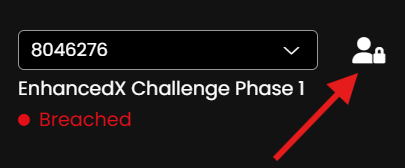
?️ Step 3: Open the credentials section
Click on the credentials icon/button next to your selected account to view your login details.
? Step 4: Log in to your trading platform
Use your credentials to log in to MT4 or MT5.
Make sure you select the correct server and platform (MetaTrader 4 or MetaTrader 5) when logging in, as this information is specific to your account.
? Alternative Method: Check your email
When your account is created, your credentials are automatically sent to your registered email address.
If you cannot find them in your inbox, please check your spam or junk folder.
⚠️ Important
Keep your credentials secure and private
Do not share your login details with third parties
If you cannot access your credentials, contact support for assistance
Was this article helpful?
That’s Great!
Thank you for your feedback
Sorry! We couldn't be helpful
Thank you for your feedback
Feedback sent
We appreciate your effort and will try to fix the article